



Looking for a VPN client for macOS 27? VPN Tracker is ready for macOS 27 Golden Gate. Whether you are connecting to an office firewall, a client network, your home lab, or a remote file server, VPN Tracker brings the protocols and connection tools you need together in one native Mac app.
VPN Tracker support for macOS 27 Golden Gate
VPN Tracker is fully compatible with macOS 27 Golden Gate. This means you can upgrade your supported Mac and continue using VPN Tracker for professional VPN access without replacing your connection setup with a patchwork of separate clients.
For anyone testing Apple’s beta software, the best practice is still to update VPN Tracker first, keep a backup of important connection information, and test business-critical tunnels before upgrading a production Mac. VPN gateways and authentication systems can vary, so a short real-world test with your own network is always worthwhile.
What does VPN Tracker do?
VPN Tracker is a professional VPN client for Mac, iPhone, and iPad. It creates an encrypted tunnel from your Apple device to a VPN gateway, such as a company firewall, router, cloud VPN service, or remote office. Once connected, you can use the internal services your administrator has made available—for example file servers, web apps, remote desktops, databases, development systems, or smart-building controls.
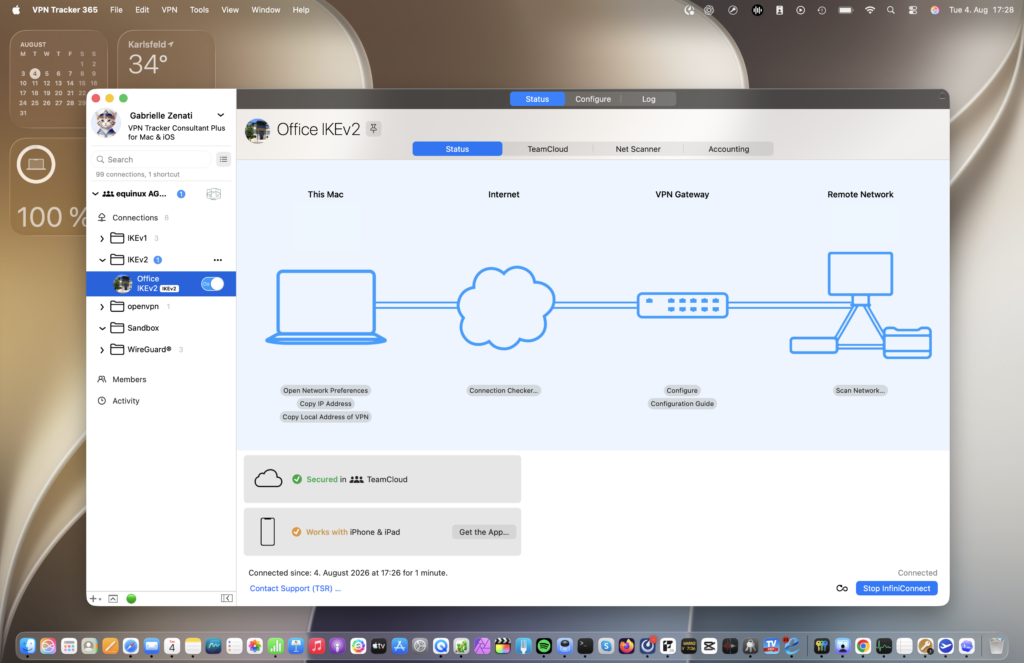
Unlike consumer “change my location” VPN services, VPN Tracker is designed primarily for connecting to networks you or your organization control. It supports hundreds of gateway models and more than ten VPN standards, so you can manage very different customer, office, and lab connections in one place.
Main VPN Tracker features
- Native Mac experience: VPN Tracker is developed for Apple platforms and works on both Apple silicon and Intel Macs supported by the app.
- 300+ gateway profiles: Tested presets and configuration guides help you connect to popular systems from Cisco, Fortinet, SonicWall, Ubiquiti, WatchGuard, Check Point, LANCOM, NETGEAR, Synology, and many more.
- Easy import and organization: Import OpenVPN and WireGuard configurations, group connections in folders, and keep multiple office or customer tunnels in one app.
- Personal Safe: Store and sync personal VPN connections using encrypted backup, so they are available on your eligible Apple devices.
- TeamCloud: Administrators can distribute ready-to-use VPN connections to team members with end-to-end encryption, update them centrally, and revoke access when needed.
- AutoConnect: On eligible plans, VPN Tracker can automatically activate the appropriate VPN when you access a matching internal service.
- InfiniConnect: The Mac app can detect an interrupted tunnel and restore it automatically, helping long-running remote sessions stay available.
- Professional troubleshooting: Detailed logs and built-in diagnostics make it easier to identify authentication, routing, DNS, and gateway configuration issues.
- Business deployment: IT teams can deploy VPN Tracker with MDM solutions such as Jamf, Microsoft Intune, or Kandji and provide consistent configurations across managed Macs.
Feature availability depends on your VPN Tracker plan and platform. The free trial lets you test the relevant plan with your own VPN gateway before committing.
Which VPN protocols does VPN Tracker support?
VPN Tracker supports a broad range of current and legacy business VPN technologies. That matters when one organization uses WireGuard while another still relies on an established IPsec, SSL VPN, or L2TP setup.
- OpenVPN
- WireGuard®
- IKEv2
- IPsec
- SSTP
- Fortinet SSL VPN
- SonicWall SSL VPN and Simple Client Provisioning
- Cisco AnyConnect SSL, Cisco Easy VPN, and Cisco Meraki VPN
- WatchGuard Mobile User VPN
- Check Point Hybrid Mode
- Mode Config connections for systems such as NETGEAR, Juniper, and LANCOM
- L2TP and PPTP on supported Mac configurations
Which devices can run VPN Tracker?
VPN Tracker is available for Mac, iPhone, and iPad. The current Mac download supports Apple silicon and Intel Macs running macOS 11 or later; the iPhone and iPad app supports iOS/iPadOS 15 or later. Eligible plans can use the same VPN Tracker account across Mac and iOS, with Personal Safe or TeamCloud making approved connections available on multiple devices.
What’s new in macOS 27 Golden Gate?
Apple previewed macOS 27 Golden Gate at WWDC26 with a strong focus on intelligence, refinement, and performance. Headline additions include:
- Siri AI: A more conversational assistant with personal context, broader knowledge, in-app actions, and a dedicated Siri app.
- Visual Intelligence on Mac: Ask questions about content on your screen and take action from screenshots.
- Apple Intelligence in everyday apps: Smarter Safari tab grouping and page monitoring, expanded photo editing, and natural-language Shortcut creation.
- Liquid Glass refinements: Improved readability and contrast, more consistent toolbars and sidebars, and a slider for adjusting the appearance.
- Performance improvements: Apple highlights quicker AirDrop transfers, faster network file browsing, and more responsive Safari start-page loading.
- Better display support: Higher resolutions and refresh rates for ultra-wide displays, including configurations such as 5K at 120 Hz on supported hardware.
When will macOS 27 be released?
Apple says macOS 27 Golden Gate will be available as a free software update in autumn 2026. The developer beta was released after WWDC26 in June, with a public beta announced for July. Apple has not provided an exact public release day, so “autumn 2026” is the most accurate official timing for now.
If Apple follows its usual annual schedule, a general release around September or October would be a reasonable expectation—but that is an inference, not a confirmed date. Business users should plan their rollout around application testing rather than a guessed day.
For the latest details, see Apple’s macOS 27 Golden Gate preview.

Connect with VPN Tracker, the best VPN Client for MacOS 27
How to prepare your VPN before upgrading to macOS 27
- Update VPN Tracker: Install the latest available version before starting the macOS upgrade.
- Protect your setup: Make sure important connections are stored in Personal Safe, deployed through TeamCloud, or otherwise backed up according to your organization’s policy.
- Test before rollout: Verify authentication, DNS, file shares, remote desktops, and internal web services with your own gateway and update and VPN Tracker deployment on a pilot Mac before a broad rollout.
Ready for macOS 27? Get VPN Tracker for Mac
Bring your business VPN connections, gateway profiles, and professional connection tools into one Mac-native app. Download VPN Tracker and test it with your own network.