



VPN Tracker 26.8 führt Beta-Unterstützung für Palo Alto Networks GlobalProtect VPN-Verbindungen, neue Authentifizierungs- und Verschlüsselungsfunktionen für OpenVPN sowie eine einfachere Organisation Ihrer Verbindungen ein. Das Update bringt außerdem wichtige Zuverlässigkeitsverbesserungen für GlobalProtect, SonicWall SSL, WireGuard, Split DNS, AppleScript-Automatisierung und schnelle Neuverbindungen. Wenn Ihr Unternehmen GlobalProtect oder erweiterte OpenVPN-Konfigurationen einsetzt, lohnt sich dieses Update besonders.
GlobalProtect-VPN-Unterstützung (Beta)
VPN Tracker 26.8 führt die Unterstützung für Palo Alto Networks GlobalProtect VPNs als Beta ein – eine wichtige Erweiterung für Mac-Nutzer, die sicheren Zugriff auf Unternehmensnetzwerke benötigen. GlobalProtect-Verbindungen lassen sich jetzt zusammen mit Ihren anderen geschäftlichen VPNs in VPN Tracker verwalten. So können Sie Ihren Remote-Zugriff unter macOS zentral organisieren, starten und bei Bedarf diagnostizieren.

GlobalProtect-Unterstützung im Überblick
GlobalProtect-Umgebungen verwenden häufig mehrere Authentifizierungsstufen über ein Portal und ein oder mehrere Gateways. VPN Tracker unterstützt diese Abläufe einschließlich Passwortabfragen, browserbasierter Anmeldung, Einmalcodes, Challenge-Antworten und Authentifizierungs-Cookies.
Die aktuelle Version enthält außerdem wichtige Zuverlässigkeitsverbesserungen für reale GlobalProtect-Umgebungen. VPN Tracker kann Authentifizierungs-Cookies wiederverwenden, um wiederholte Anmeldungen zu reduzieren, aktuelle Portal-Zugangsdaten bei der Verbindung mit einem Gateway bevorzugen, ein separat angefordertes Gateway-Passwort aus dem macOS-Schlüsselbund abrufen und sich zuverlässiger wiederherstellen, wenn ein Portal oder Gateway eine andere Authentifizierungsmethode verlangt.

Neu: Die aktuelle Version unterstützt Palo Alto GlobalProtect-Verbindungen
Mit welchen Palo Alto Networks Geräten kann ich mich verbinden?
VPN Tracker unterstützt GlobalProtect-Verbindungen mit zahlreichen Palo Alto Networks Firewalls und Cloud-Bereitstellungen. Zu den bekanntesten Beispielen gehören:
- PA-400 Series – einschließlich PA-410, PA-440, PA-450 und PA-460
- PA-1400 Series – einschließlich PA-1410 und PA-1420
- PA-3400 Series – für größere Unternehmensnetzwerke
- VM-Series Virtual Firewalls – für virtualisierte Umgebungen und Cloud-Umgebungen
- Prisma Access – für GlobalProtect Mobile Users-Bereitstellungen
Da sich die GlobalProtect-Unterstützung derzeit in der Beta-Phase befindet, kann die Kompatibilität je nach PAN-OS-Version, Portal- und Gateway-Konfiguration, Lizenzierung und Authentifizierung variieren. Wir empfehlen, Ihre konkrete Umgebung vor einem breiteren Rollout zu testen.
Wer kann die GlobalProtect-Unterstützung testen?
Alle können die Funktion testen. Die GlobalProtect-Unterstützung ist in der aktuellen Vollversion von VPN Tracker 26.8 enthalten. Es gibt daher weder eine separate Beta-App noch einen speziellen Download-Kanal. VPN Tracker selbst ist eine reguläre Produktivversion; lediglich der neue GlobalProtect-Verbindungstyp befindet sich noch in der Beta-Phase.
Die Beta-Kennzeichnung ist als Testhinweis zu verstehen: Bevor Sie GlobalProtect für geschäftskritische Zugriffe einsetzen, sollten Sie die Anmeldung an Portal und Gateway, die Browser-Authentifizierung, MFA- oder Einmalcode-Abfragen, Challenge-Antworten, interne DNS-Auflösung und Ressourcen sowie das Verhalten bei Neuverbindungen in Ihrer eigenen Umgebung prüfen. Bitte senden Sie uns Ihr Feedback – insbesondere, wenn Ihre Konfiguration eine mehrstufige Authentifizierung oder gerätegebundene Cookies verwendet.
So verbinden Sie sich mit GlobalProtect in VPN Tracker
In wenigen Schritten können Sie loslegen:
- Installieren Sie die aktuelle VPN Tracker Version oder führen Sie ein Update durch
- Öffnen Sie den VPN Tracker Connection Creator für Palo Alto GlobalProtect
- Geben Sie Ihre Verbindungsdaten ein und speichern Sie die Verbindung in Ihrem VPN Tracker Account
Palo Alto Einrichtungsanleitung: Unsere Schritt-für-Schritt-Anleitung enthält ausführliche Informationen zu unterstützten Geräten, zur Einrichtung des VPN-Zugriffs für Palo Alto und zum Rollout im Team. Anleitung lesen →
OpenVPN-Verbesserungen
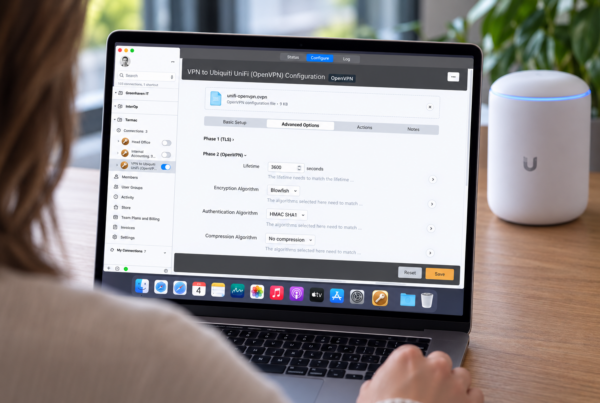
VPN Tracker 26.8 erweitert die OpenVPN-Kompatibilität um Unterstützung für tls-crypt-v2-Client-Schlüssel, statische Challenge-Authentifizierung und zusätzliche Authentifizierungs- und Verschlüsselungsoptionen. Zusammen erleichtern diese Verbesserungen den Einsatz von VPN Tracker mit anspruchsvollen OpenVPN-Umgebungen und Konfigurationen, die eine mehrstufige Authentifizierung erfordern.
tls-crypt-v2-Client-Schlüssel
OpenVPN-Verbindungen in VPN Tracker unterstützen jetzt tls-crypt-v2-Client-Schlüssel. Diese OpenVPN-Option verwendet einen clientspezifischen Schlüssel, um den Steuerkanal zu schützen, bevor die TLS-Sitzung aufgebaut wird. Wenn Ihr Unternehmen bereits tls-crypt-v2 in seinen OpenVPN-Profilen bereitstellt, kann VPN Tracker den mitgelieferten Client-Schlüssel nun beim Verbindungsaufbau verwenden. So lassen sich auch anspruchsvolle OpenVPN-Umgebungen einfacher in demselben Mac VPN Client verwalten wie Ihre anderen Verbindungen.
Statische Challenge-Authentifizierung
VPN Tracker 26.8 unterstützt außerdem die statische Challenge-Authentifizierung von OpenVPN. Wenn ein OpenVPN-Gateway sowohl ein reguläres Passwort als auch einen Einmalcode verlangt, kann VPN Tracker separate Eingabefelder für Passwort und Einmalcode anzeigen. Dies ist besonders hilfreich für OpenVPN Access Server und andere Konfigurationen, die die static-challenge-Option für die Zwei-Faktor-Authentifizierung verwenden. Nutzer können die Abfrage direkt beim Verbindungsaufbau beantworten, ohne Passwort und Einmalcode manuell kombinieren zu müssen.
Neue Authentifizierungs- und Verschlüsselungsoptionen
Zusätzlich zu tls-crypt-v2 und statischen Challenges bietet diese Version weitere OpenVPN-Authentifizierungs- und Verschlüsselungsoptionen. Diese Optionen verbessern die Kompatibilität mit OpenVPN-Gateways, die speziellere Kombinationen von Authentifizierungs- und Verschlüsselungseinstellungen verwenden. Wenn ein vorhandenes OpenVPN-Profil die für Ihr Gateway erforderlichen Einstellungen bisher nicht angeboten hat, aktualisieren Sie VPN Tracker und prüfen Sie die OpenVPN-Konfigurationsoptionen der Verbindung. Ihr VPN-Administrator kann Ihnen sagen, welche Werte in Ihrer Umgebung erforderlich sind.
Sie verwenden OpenVPN zum ersten Mal in VPN Tracker? Lesen Sie unsere Anleitung zum Verbinden mit OpenVPN über VPN Tracker.
Außerdem neu in VPN Tracker 26.8
Diese Version enthält zahlreiche Verbesserungen für Verbindungsverwaltung, Authentifizierung, Netzwerkverhalten, Automatisierung und Diagnose:
- Alphabetische Verbindungssortierung: Sortieren Sie Verbindungslisten alphabetisch, um Kunden-, Büro- und Test-VPNs schneller zu finden – auch in verschachtelten Gruppen.
- SonicWall SSL: Anmeldefehler wurden behoben, die eine erfolgreiche Authentifizierung verhindern konnten.
- GlobalProtect-Authentifizierung: Authentifizierungs-Cookies werden zuverlässiger wiederverwendet, auch bei Servern, die Cookies an ein bestimmtes Gerät binden. VPN Tracker bevorzugt nun die aktuellen Portal-Zugangsdaten am Gateway und kann ein im Schlüsselbund gespeichertes Passwort verwenden, wenn das Gateway ein separates Passwort verlangt.
- GlobalProtect-Wiederherstellung: Verbindungen werden zuverlässiger wiederhergestellt, wenn ein Gateway Portal-Zugangsdaten, eine Web-Anmeldung, ein Passwort oder eine Challenge-Antwort ablehnt.
- GlobalProtect-Diagnose: Detailliertere Protokolle für Authentifizierung, Gateway-Fehler und Tunnelaufbau erleichtern die Fehlerbehebung.
- Split DNS: Von VPN-Gateways übermittelte Domains werden korrekt angewendet; zugleich arbeitet DNS bei Netzwerkwechseln zuverlässiger.
- Zuverlässigere Neuverbindungen: VPN-Authentifizierung und Verbindungsaufbau sind zuverlässiger, auch bei mehreren schnellen Neuverbindungen hintereinander.
- WireGuard: Full-Tunnel-Verbindungen reagieren jetzt zuverlässiger auf Netzwerkwechsel.
- AppleScript: Verschachtelte Verbindungsgruppen werden zuverlässig verarbeitet, Ping-Ergebnisse korrekt zurückgegeben und Skripte können optional warten, bis eine Verbindung vollständig gestartet oder beendet wurde.
- Update-Informationen: Der Update-Dialog zeigt jetzt sowohl das verfügbare Update als auch die aktuell installierte VPN Tracker Version an.
Kompatible macOS-Versionen und Macs
VPN Tracker 26.8 unterstützt:
- macOS 27 Golden Gate
- macOS 26 Tahoe
- macOS 15 Sequoia
- macOS 14 Sonoma
- macOS 13 Ventura
- macOS 12 Monterey
- macOS 11 Big Sur
Das Update läuft sowohl auf Macs mit Apple-Chip, einschließlich M1-, M2-, M3- und M4-Modellen, als auch auf Intel-basierten Macs.
VPN Tracker 26.8 herunterladen
Dieses Update ist für alle bestehenden VPN Tracker Nutzer kostenlos.
So führen Sie das Update auf Ihrem Mac durch: Öffnen Sie VPN Tracker und wählen Sie VPN Tracker > Nach Updates suchen. Das Update-Fenster zeigt jetzt auch die aktuell installierte Version an. So können Sie einfach überprüfen, ob das Update erfolgreich abgeschlossen wurde.
Sie nutzen VPN Tracker noch nicht? Sie können Company Connect 7 Tage kostenlos testen. Für sicheres Surfen unterwegs steht außerdem eine 24-Stunden-Testversion von World Connect zur Verfügung.
Bereit für VPN Tracker 26.8?
Laden Sie die aktuelle VPN Tracker Version für Mac herunter und testen Sie die neuen GlobalProtect- und OpenVPN-Funktionen mit Ihrer eigenen VPN-Umgebung.
VPN Tracker 26.8 herunterladen