



About Debian VPN
Debian is widely regarded as the "Universal Operating System," providing the rock-solid foundation for millions of enterprise servers and VPN gateways. While configuring the server-side is a straightforward task for Linux administrators, providing a seamless, high-performance connection experience for Mac and iOS users often requires a more specialized client. VPN Tracker bridges this gap, offering a professional interface for Debian VPN services.

Universal Debian VPN Support
Whether your Debian instance is running as a physical gateway, a virtual machine, or in the cloud, VPN Tracker provides native support for the primary VPN stacks used on the platform. This ensures that regardless of your internal security requirements, your Apple device users can connect with a single click.
- WireGuard: Leverage the high-speed, modern kernel-level performance of WireGuard on Debian 11 (Bullseye), 12 (Bookworm), and 13 (Trixie).
- OpenVPN: Connect to stable OpenVPN deployments with full support for custom encryption and routing.
- IKEv2 (strongSwan / LibreSwan): Utilize industry-standard IPsec for enterprise-grade stability and mobile roaming.
Streamlined Integration on macOS and iOS
VPN Tracker eliminates the need for manual configuration profile creation on individual Apple devices. By using the specialized Debian connection creators, administrators can import and personalize multiple WireGuard or OpenVPN configuration files, such as .ovpn or .conf, in a single step. This multi-import capability allows for the rapid onboarding of various gateway locations or user-specific tunnels, ensuring that all DNS settings, routing rules, and security certificates are applied correctly without manual intervention.
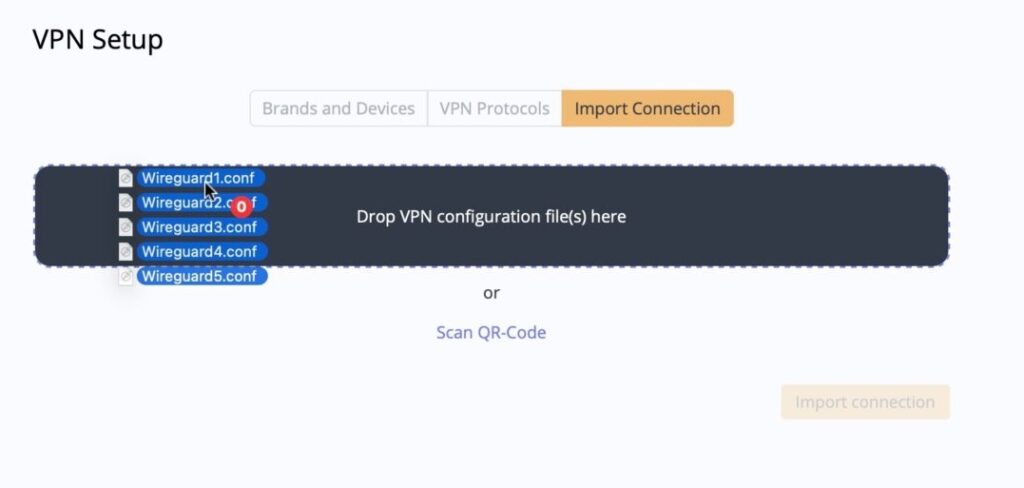
Import multiple WireGuard connections for Debian VPN into VPN Tracker at once.
Scaling Your Debian VPN with VPN Tracker TeamCloud
For organizations managing multiple Debian VPN gateways or large teams, manual setup becomes inefficient. VPN Tracker TeamCloud allows administrators to configure a connection once and roll it out to an entire department or company instantly. This centralized management ensures that any updates to the Debian server’s endpoint or security parameters are automatically pushed to all team members, maintaining continuous uptime and security compliance.
Admins can securely save and test connection settings privately before publishing them to the rest of the team. This controlled deployment cycle offers several advantages for Debian-based infrastructure:
- Publishing Workflow: Validate the server configuration and routing rules in your personal account before pushing the live connection to your users
- Granular Access Controls: Assign specific Debian gateways to different departments or user groups based on project requirements
- Unique WireGuard Tunnels: Easily manage and assign unique WireGuard peer configurations to individual users, maintaining strict security and auditability
- Zero-Touch Deployment: Once published, connections appear automatically in the user’s VPN Tracker app on Mac and iOS, ready for use. Zero-trust settings keep configuration details hidden
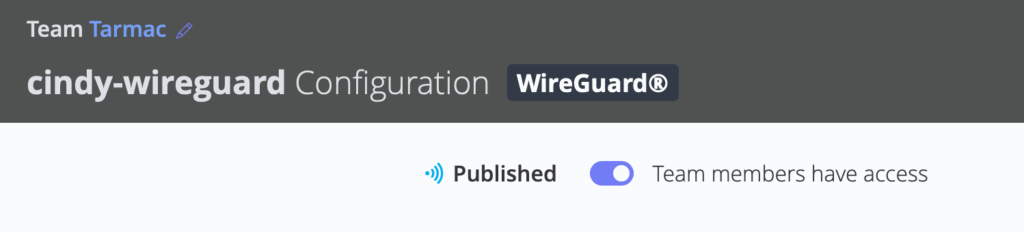
Publish a Debian VPN connection to give users individual access. Unpublished connections are not visible to the team.
How to Get Started
Once your Debian VPN server is active and you have your configuration details or files ready, follow these steps:
- Open the VPN Tracker Connection Creator for Debian VPN and select your protocol (WireGuard, OpenVPN, or IKEv2)
- Drag and drop your configuration file or enter your server details in the fields provided
- Click to securely save your connection in your account using end-to-end encryption
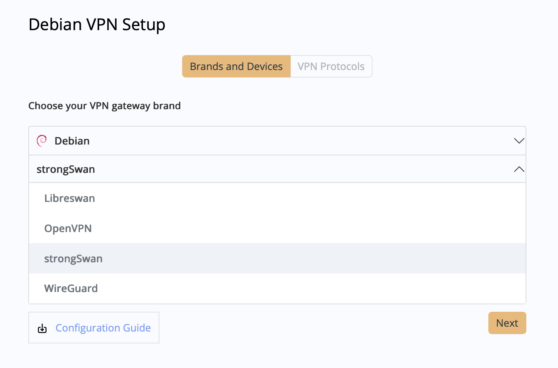
Connect to Debian IKEv2 strongSwan in VPN Tracker for Mac and iOS
Ready to connect your Debian VPN?
By pairing the legendary stability of Debian with the professional interface of VPN Tracker, you ensure that your remote access on Mac and iOS devices is both powerful and user-friendly.